You can delete the files directly from ~/Library/MobileDevice/Provisioning Profiles
Open finder, ⌘-Shift-G, and paste in the above path. Restart Xcode afterward.
Wednesday, January 8, 2014

UIScrollView and Autolayout Demystified
Just finished reading and implementing the described examples in the following link:
Chapter 20. Scroll Views
I was very impressed with this thorough yet easy to read description of how scroll views work.
Chapter 20. Scroll Views
I was very impressed with this thorough yet easy to read description of how scroll views work.
Thursday, December 12, 2013
Objective C, JSON APIs and a few details worth noting...
Types that can be returned by JSON API:
When parsing JSON with Objective C's NSJSONSerialization class we get the following conversions:
*Note that boolean to NSNumber will NSLog itself as __NSCFBoolean. What?! We just noted above that booleans get parsed as NSNumbers!! Okay, settle, it all does make sense with a little further explanation; __NSCFBoolean is a private class that is used in the NSNumber class cluster. Don't concern yourself with it. Understand that JSON response fields containing a boolean will get parsed as an NSNumber and that to check the parsed value for its meaning (i.e. true/false) you can NOT do if (myBoolean) or if (!myBoolean). Instead, you need to check if ([myBoolean boolValue]) or if (![myBoolean boolValue]) respectively.
*Note that null to NSNull is different than what you might hope for (null to nil). If you send a message to NSNull that it doesn't understand (this is easy to do if you're working with an optional string field), NSNull will crash your app (as opposed to just returning nil). Yikes!
So, how does it all add up? Well, from my experience as a PHP programmer, API developer, and iOS client creator... I'd break it down like this:
Strings, numbers, booleans, and nulls all serve a purpose on the server (both the backend database and API application layer (PHP)). For example, null means a value that hasn't yet been defined. We write queries using null, do special application logic based on it (i.e. send an email where we otherwise wouldn't, etc). It's true that in some cases the null value might even be important to the client, and if so, could be passed on through. However, from my experience, it rarely is. With Objective C being a strongly typed language and the risk of crashing being very real, I've found that I like writing APIs that simplify their output to just strings. 99% of the time, even when receiving a number from the API, I am getting it so I can display it in the UI (i.e. I need it as a string). Therefore the simplicity of working with an all strings API is wonderful and also helps avoid app crashes. I even like to switch my boolean values to strings and just use yes or no. I like the way it reads and keeps the entire API as strings only.
It's all about style. For me, I've found simplifying my API output makes for an easier to use JSON API for my iOS apps.
- string
- number
- boolean
- null
When parsing JSON with Objective C's NSJSONSerialization class we get the following conversions:
- string (NSString)
- number (NSNumber)
- boolean (NSNumber*)
- null (NSNull*)
*Note that boolean to NSNumber will NSLog itself as __NSCFBoolean. What?! We just noted above that booleans get parsed as NSNumbers!! Okay, settle, it all does make sense with a little further explanation; __NSCFBoolean is a private class that is used in the NSNumber class cluster. Don't concern yourself with it. Understand that JSON response fields containing a boolean will get parsed as an NSNumber and that to check the parsed value for its meaning (i.e. true/false) you can NOT do if (myBoolean) or if (!myBoolean). Instead, you need to check if ([myBoolean boolValue]) or if (![myBoolean boolValue]) respectively.
*Note that null to NSNull is different than what you might hope for (null to nil). If you send a message to NSNull that it doesn't understand (this is easy to do if you're working with an optional string field), NSNull will crash your app (as opposed to just returning nil). Yikes!
So, how does it all add up? Well, from my experience as a PHP programmer, API developer, and iOS client creator... I'd break it down like this:
Strings, numbers, booleans, and nulls all serve a purpose on the server (both the backend database and API application layer (PHP)). For example, null means a value that hasn't yet been defined. We write queries using null, do special application logic based on it (i.e. send an email where we otherwise wouldn't, etc). It's true that in some cases the null value might even be important to the client, and if so, could be passed on through. However, from my experience, it rarely is. With Objective C being a strongly typed language and the risk of crashing being very real, I've found that I like writing APIs that simplify their output to just strings. 99% of the time, even when receiving a number from the API, I am getting it so I can display it in the UI (i.e. I need it as a string). Therefore the simplicity of working with an all strings API is wonderful and also helps avoid app crashes. I even like to switch my boolean values to strings and just use yes or no. I like the way it reads and keeps the entire API as strings only.
It's all about style. For me, I've found simplifying my API output makes for an easier to use JSON API for my iOS apps.
Wednesday, September 25, 2013
Saturday, September 7, 2013
How can I get certain domain names to resolve locally using Mac OS X?
By default, all domain names will be looked up via online DNS servers. To resolve locally, we need to override this behavior. We do this by editing our /etc/hosts file. Open it (you'll be prompted for your password). In order to get a certain domain name, say example.com, to resolve locally, add a line that looks like this:
127.0.0.1 examplesite.comThe 127.0.0.1 means localhost. examplesite.com should be replaced with your domain name. Upon saving the document, changes will be made live immediately. There is no need to flush cache or anything of that sort. Happy coding locally!
Monday, May 6, 2013
How do I determine the version of Apache installed on a Debian based Linux machine?
Run the following command:
sudo apachectl -VWhich will print something similar to:
Server version: Apache/2.2.16 (Debian)
Server built:   Mar  3 2013 12:09:44
Server's Module Magic Number: 20051115:24
Server loaded:  APR 1.4.2, APR-Util 1.3.9
Compiled using: APR 1.4.2, APR-Util 1.3.9
Architecture:   64-bit
Server MPM:     Prefork
  threaded:     no
    forked:     yes (variable process count)
Server compiled with....
 -D APACHE_MPM_DIR="server/mpm/prefork"
 -D APR_HAS_SENDFILE
 -D APR_HAS_MMAP
 -D APR_HAVE_IPV6 (IPv4-mapped addresses enabled)
 -D APR_USE_SYSVSEM_SERIALIZE
 -D APR_USE_PTHREAD_SERIALIZE
 -D SINGLE_LISTEN_UNSERIALIZED_ACCEPT
 -D APR_HAS_OTHER_CHILD
 -D AP_HAVE_RELIABLE_PIPED_LOGS
 -D DYNAMIC_MODULE_LIMIT=128
 -D HTTPD_ROOT="/etc/apache2"
 -D SUEXEC_BIN="/usr/lib/apache2/suexec"
 -D DEFAULT_PIDLOG="/var/run/apache2.pid"
 -D DEFAULT_SCOREBOARD="logs/apache_runtime_status"
 -D DEFAULT_LOCKFILE="/var/run/apache2/accept.lock"
 -D DEFAULT_ERRORLOG="logs/error_log"
 -D AP_TYPES_CONFIG_FILE="mime.types"
 -D SERVER_CONFIG_FILE="apache2.conf"
Wednesday, May 1, 2013
How do I create a Facebook web app using CodeIgniter?
First things first, this tutorial assumes you have the following setup:

 Next, pass through the security check:
 Great. Now fill out the rest of your application's profile as shown in this screenshot:
 After clicking "Save Change" you'll see the following success message:

Okay, now download the latest version of CodeIgniter:
 Then unzip your download:
 Then add your own web root dir named "www" and rename your CI parent folder to your app's domain name:
 Move the folder to your home directory:

Okay, now spin up a new web server:

Next, config your DNS:
 Now open up Terminal and cd into your project directory.
 After walking through the process pictured above twice (once locally, and once on your remote production machine), open the following two files:

The rest of this post is going to assume you have an empty database setup in both your local and remote environments and that you've properly filled out your _env.php and _release.php files.
We'll continue to use clitools throughout this tutorial but now is a good time to mention that you can read more about clitools at clitools.org.
Ok, back to the task at hand. Your local database should look like this:
 Now again, on your local machine, run the following command:
 If you click into the version table you'll see:

Next, create a BitBucket (or GitHub) project repo:
 Next, on your local machine, go to the root of your project dir via the following command:
Now that you're on your remote machine, run the following command:
This tutorial assumes you have your remote apache server environment set up properly. You can exit your remote machine:
You can run a git status just to see where we're at right now.
Run the following command:
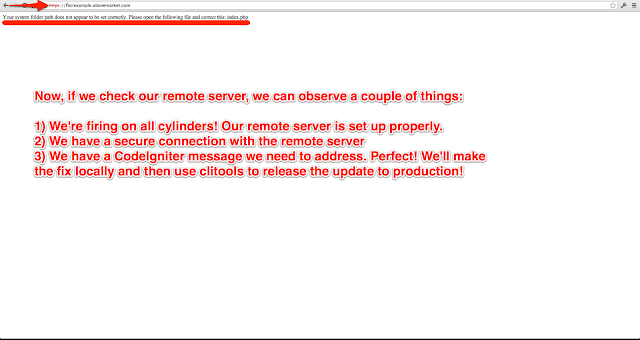 On your local machine, run the following command:
 Congrats! You're on fire!
Want pretty URLs? Me too. Add the following .htaccess file in www/:
- A Mac
- A remote server running Debian 6.06 (Squeeze)
- A Facebook account
- And a copy of MAMP Pro running on your local machine
Okay, first we need to create a Facebook app. Go here: https://developers.facebook.com/apps?ref=bookmarks&count=0&fb_source=bookmark_apps&fb_bmpos=6_0 (and for the record, yes, I think that's a totally weird looking URL). Then, click the "Create New App" button as shown in the following screenshot:

Next, name your app and then click the "Continue" button:


Okay, now download the latest version of CodeIgniter:


Okay, now spin up a new web server:

Next, config your DNS:

cd ~/fbciexample.abovemarket.comNow run the following command:
git initYou'll see the following output:
Initialized empty Git repository in /Users/johnerck/fbciexample.abovemarket.com/.git/Next, add clitools for release management. If you don't already have clitools on your local machine, run the following command to git clone it to your home directory:
git clone git@bitbucket.org:abovemarket/clitools.org.git ~/clitools.orgYou'll see the following output:
Cloning into '/Users/johnerck/clitools.org'...
remote: Counting objects: 132, done.
remote: Compressing objects: 100% (112/112), done.
remote: Total 132 (delta 41), reused 0 (delta 0)
Receiving objects: 100% (132/132), 256.54 KiB, done.
Resolving deltas: 100% (41/41), done.
Okay, after running that command, run this next:
php ~/clitools.org/clitools/installto.php ~/fbciexample.abovemarket.com/clitoolsYou'll see the following output:
Success: You've successfully installed clitools to ~/fbciexample.abovemarket.com/clitools/Okay, now it's time to create both our local and remote databases:

open ~/fbciexample.abovemarket.com/clitools/_env.php
open ~/fbciexample.abovemarket.com/clitools/_release.php
Add your database credentials as illustrated:

The rest of this post is going to assume you have an empty database setup in both your local and remote environments and that you've properly filled out your _env.php and _release.php files.
We'll continue to use clitools throughout this tutorial but now is a good time to mention that you can read more about clitools at clitools.org.
Ok, back to the task at hand. Your local database should look like this:

php ~/fbciexample.abovemarket.com/clitools/uschema.phpAfter running that command you should see the following output:
mysql -h localhost -u fbciexample -p********** fbciexample < ~/fbciexample.abovemarket.com/clitools/changes/schema/1.sql
Success: Your database is up to date (at 1.sql)
Files Applied:
~/fbciexample.abovemarket.com/clitools/changes/schema/1.sql
Now, if you refresh your database page it should look like this:


Next, create a BitBucket (or GitHub) project repo:

cd ~/fbciexample.abovemarket.comOkay, now run the following commands:
git remote add origin ssh://git@bitbucket.org/abovemarket/fbciexample.abovemarket.com.git
git add .
git commit -m 'Initial commit'Now open your .git/config file:
nano .git/configAdd the following lines to the end (make sure you indent using one tab rather than 4 spaces):
[branch "master"]
    remote = origin
    merge = refs/heads/master
Save the file. Push your changes:
git push -u origin --allYou'll see the following output:
Counting objects: 410, done.
Delta compression using up to 8 threads.
Compressing objects: 100% (394/394), done.
Writing objects: 100% (410/410), 2.17 MiB | 3.96 MiB/s, done.
Total 410 (delta 127), reused 0 (delta 0)
remote: bb/acl: johnerck is allowed. accepted payload.
To ssh://git@bitbucket.org/abovemarket/fbciexample.abovemarket.com.git
 * [new branch]      master -> master
Branch master set up to track remote branch master from origin.
Great. Now ssh into your remote machine:
ssh -p your_port you@your_ip_addressRemember that if you run into trouble here, it may be because you have MAMP turned on and so whatever domain you're using is resolving to localhost rather than hitting the net.
Now that you're on your remote machine, run the following command:
git clone git@bitbucket.org:abovemarket/fbciexample.abovemarket.comYou'll see the following output:
Cloning into fbciexample.abovemarket.com...
remote: Counting objects: 410, done.
remote: Compressing objects: 100% (267/267), done.
remote: Total 410 (delta 127), reused 410 (delta 127)
Receiving objects: 100% (410/410), 2.17 MiB, done.
Resolving deltas: 100% (127/127), done.
The directory created when you get cloned the project needs to match apache's web root. If you're interested in knowing how to set up vhosts, checkout a post I did awhile back on that topic: http://oneqonea.blogspot.com/2013/04/how-do-i-set-up-apache-virtual-hosts-on.html
This tutorial assumes you have your remote apache server environment set up properly. You can exit your remote machine:
exitOkay, now it's time to release our app!
You can run a git status just to see where we're at right now.
git statusIt should output:
# On branch master
nothing to commit (working directory clean)
Okay, great. Since our current branch is "clean", we know we can release. Since we're on the "master" branch, we know we're about to release master (this is the nature of clitools).
Run the following command:
php clitools/releaseto.php productionclitools will tell you what it's doing while it runs. The last line should say:
Local status: You've successfully released your project from master to production (v00.001.000)clitools just did a number of things for us. A quick review would include:
- Created a new release branch (rb00.001)
- Created a new release tag from that branch (v00.001.000)
- Ssh'd into our remote machine and checked out git tag v00.001.000
- Triggered clitools/uschema.php (updated the target machine's database)
- Triggered clitools/udata.php (php file that's available to be run on release if need be)
- Updated clitools/version.php's file content with v00.001.000
- Version stamped each change file applied (if target was "production")
- Version stamped a copy of udata's source file (regardless of target environment but only if udata's source file was not empty)
- Printed a success message to our screen and pushed the release branch to origin so the rest of our team can be in the loop!
 On your local machine, run the following command:
open ~/fbciexample.abovemarket.com/www/index.phpAdd the following lines of php code to the top of the file after the opening php tag:
require_once dirname(__FILE__) . '/../clitools/_env.php';
date_default_timezone_set('UTC'); // So we can call new DateTime();
Where the file says:
define('ENVIRONMENT', 'development');
Replace it with:
$ci_environment_translation = CLITOOLS__ENVIRONMENT === 'local' ? 'development' : CLITOOLS__ENVIRONMENT;
define('ENVIRONMENT', $ci_environment_translation);
If you want errors to get logged in production, switch production's error_reporting from error_reporting(0); to:
error_reporting(E_ALL);Now set $system_path and $application_folder like so:
$system_path = CLITOOLS__CI_SYSTEM_PATH;
$application_folder = CLITOOLS__CI_APPLICATION_FOLDER;
Now open your clitools/_env.php file:
open ~/fbciexample.abovemarket.com/clitools/_env.phpAdd the following lines to your _env.php file (but translated for YOUR local machine of course):
define('CLITOOLS__CI_SYSTEM_PATH', '/Users/johnerck/fbciexample.abovemarket.com/system');
define('CLITOOLS__CI_APPLICATION_FOLDER', '/Users/johnerck/fbciexample.abovemarket.com/application');
Now open your clitools/_release.php file:
open ~/fbciexample.abovemarket.com/clitools/_release.phpAdd the following lines to your _release.php file's $content var (but translated for YOUR remote machine of course):
"define('CLITOOLS__CI_SYSTEM_PATH', '/home/admin/fbciexample.abovemarket.com/system');
define('CLITOOLS__CI_APPLICATION_FOLDER', '/home/admin/fbciexample.abovemarket.com/application');"
Now run:
git status
git add .
git commit -m 'Updated some environment related settings (i.e. fixed bug in app)'
git push
php clitools/releaseto.php productionclitools will tell you what it's doing while it runs. The last line should say:
Local status: You've successfully released your project from master to production (v00.002.000)Now access your fbciexample.abovemarket.com

Want pretty URLs? Me too. Add the following .htaccess file in www/:
RewriteEngine On
RewriteBase /
RewriteCond %{REQUEST_FILENAME} !-f
RewriteCond %{REQUEST_FILENAME} !-d
RewriteRule ^(.*)$ index.php?/$1 [L]
Then
open application/config/config.phpand update to:
$config['index_page'] = ''; // Was previously 'index.php'That's all for now. At a future date I'll extend this post to show you how to install Sparks (SolidSess to be exact). That's where FB comes into the mix too! Later!
Subscribe to:
Posts (Atom)
About Me

- John Erck
- I code. I figured I should start a blog that keeps track of the many questions and answers that are asked and answered along the way. The name of my blog is "One Q, One A". The name describes the format. When searching for an answer to a problem, I typically have to visit more than one site to get enough information to solve the issue at hand. I always end up on stackoverflow.com, quora.com, random blogs, etc before the answer is obtained. In my blog, each post will consist of one question and one answer. All the noise encountered along the way will be omitted.